Introduction to Hasher-Matcher-Actioner UI
Hasher-Matcher-Actioner (aka HMA) includes a web app where users can configure their signal banks, connect to exchanges like NCMEC, StopNCII, GIFCT, ThreatExchange, and others, and debug matches. These features are available as demos to show the features and functionality of HMA, and for curation, if desired.
There are 4 pages in the app:
Dashboard (/ui/)
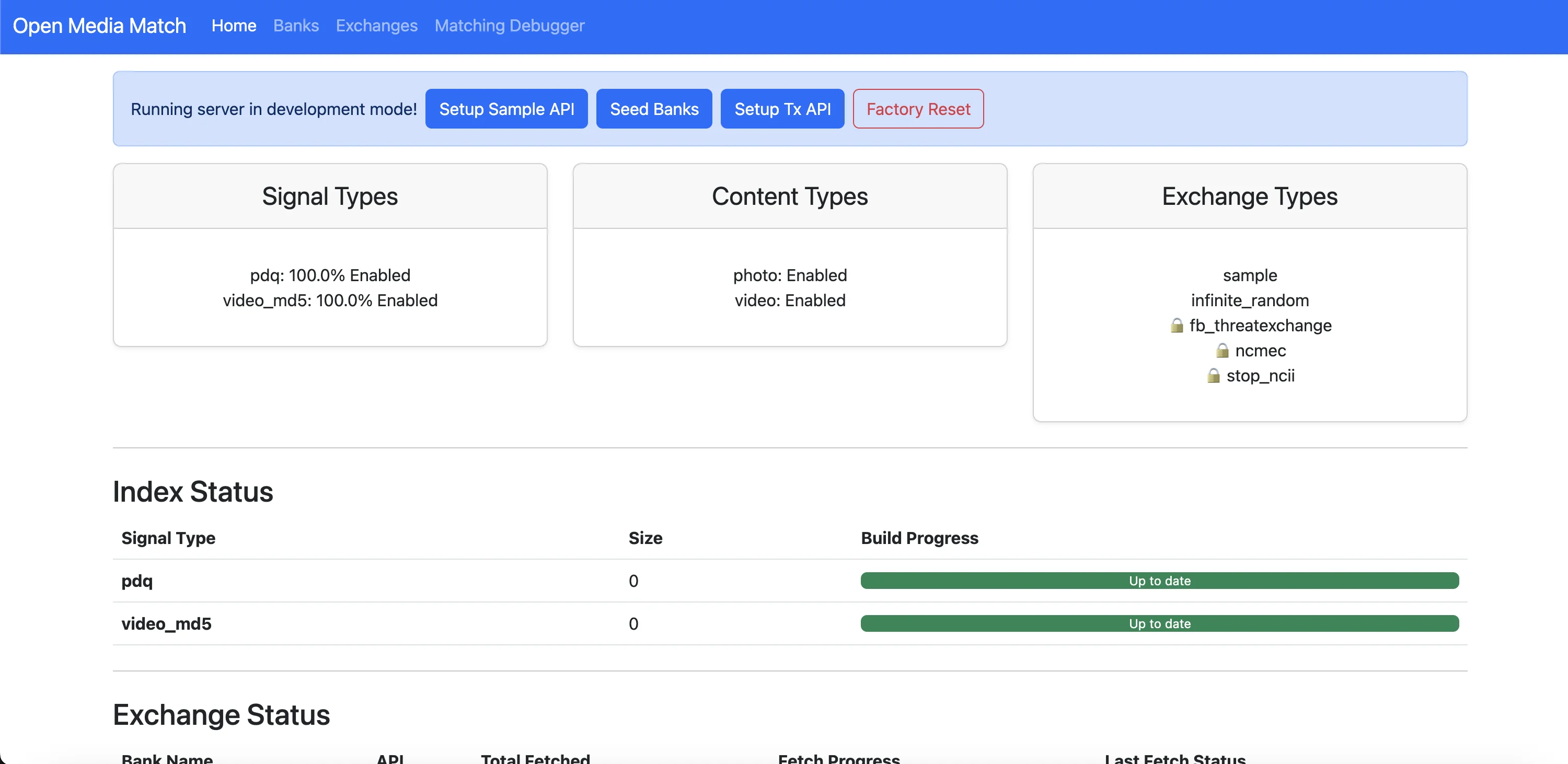
- View system status
- See signal types and content types
- Check index statistics
If the environment is set to "development", there are 3 demo buttons and an option to do a factory reset:
- Sample API: Creates synthetic/mock data for testing
- Seed Banks:: Generates 10,000 random hashes for performance testing
- Setup Tx API: Configures real ThreatExchange integration (but needs credentials for live data)
“Setup Sample API”
The Sample API (StaticSampleSignalExchangeAPI) is a testing and demonstration tool that provides pre-generated sample hash data for development and evaluation purposes.
Development Testing Tool
- Purpose: Provides a mock signal exchange that simulates real threat intelligence feeds without requiring external API credentials
- No Authentication Required: Unlike real exchanges (NCMEC, GIFCT, ThreatExchange), it doesn't need API keys or credentials
- Instant Setup: Creates sample data immediately for testing the system
Sample Data Provider
When you click "Setup Sample API" it:
- Creates the Exchange: Sets up SEED_SAMPLE exchange configuration
- Provides Sample Hashes: Returns a fixed set of example hashes for both PDQ (images) and MD5 (videos)
- Populates the System: Gives you 18 sample records initially (as seen in logs:
fetch_iter()with 18 new records") - Enables Matching: Allows you to test the matching functionality immediately
Fetching Simulation
From the logs, you can see it working:
INFO in fetcher: SEED_SAMPLE[sample] Fetching signals for SEED_SAMPLE from sample
INFO in fetcher: SEED_SAMPLE[sample] No checkpoint, should be the first fetch.
DEBUG in fetcher: SEED_SAMPLE[sample] fetch_iter() with 18 new records
INFO in fetcher: SEED_SAMPLE[sample] Fetched all data! Up to date!
Why a Sample API?
Development Workflow
- When you're developing or evaluating HMA, you need hash data to test matching
- Instead of configuring complex external APIs, you click "Setup Sample API"
- It immediately provides workable test data
Demo Purpose
- Shows System Functionality: Demonstrates how external exchanges work without real credentials
- Testing Matching: Provides known hashes you can test matching against
- Index Building: Triggers the indexing process with sample data
- UI Validation: Lets you see how the exchange status, fetching, and matching systems work
Educational Value
- Example Implementation: Shows how signal exchanges are structured
- API Pattern: Demonstrates the exchange API interface without complexity
- No External Dependencies: Works completely offline
What You See in the UI:
- Before Setup: Button shows "Setup Sample API"
- After Setup: Button shows "✅ Sample API created" and is disabled
- Exchange Status: Shows SEED_SAMPLE exchange in the exchanges page
- Index Building: Triggers automatic background indexing of the sample data
- Matching Ready: System now has data to match against
Technical Implementation:
The StaticSampleSignalExchangeAPI is essentially a hardcoded data source that:
- Returns a fixed set of sample hashes (PDQ and MD5)
- Simulates the behavior of real threat intelligence exchanges
- Provides metadata and signal data that the system can index and match against
- Requires no external network calls or authentication
More information is in StaticSample
And inline in the various signal types: https://github.com/facebook/ThreatExchange/blob/main/python-threatexchange/threatexchange/signal_type/pdq/signal.py#L93-L114
Different SignalTypes might use different sources of samples.
"Seed Banks"
Based on the code analysis and logs, the Seed Banks button:
Creates Test Banks
- Creates two Banks:
SEED_BANK_0andSEED_BANK_1 - Full Matching: Both set to 100% matching enabled
Generates Massive Sample Data
- 10,000 Total Hashes (5,000 per bank)
- Mixed Types: PDQ perceptual hashes (~5,004) + MD5 video hashes (~5,000)
- Synthetic but Realistic: Uses ThreatExchange library's random signal generators
System Effects
- Triggers Index Rebuild: Background process takes ~30 seconds
- Ready for Testing: Creates searchable data immediately
- Performance Scale: Provides substantial dataset for realistic testing
Use Cases
- Algorithm Testing: Test similarity matching algorithms
- UI Development: Populate interface with realistic data volumes
- Performance Testing: Benchmark system with substantial datasets
- Demo Workflows: Enable full end-to-end testing without real uploads
The seeded data is stored in a PostgreSQL database that runs inside the dev container:
Database Structure
- Database:
media_match - Tables:
bank,bank_content,content_signal - Host:
localhost:5432(inside the dev container) - Credentials:
media_match/hunter2
Data Organization
- 2 Banks:
SEED_BANK_0andSEED_BANK_1 - ~10,000 Total Hashes: 5,004 PDQ + 5,000 MD5
- Each Content Item: Has a unique ID and associated signal/hash values
“Setup Tx API"
The “Setup Tx API” button creates a demo integration with ThreatExchange.
Integration Details
- Exchange Name:
TX_EXAMPLE_COLLAB - API Type: Facebook's ThreatExchange API (FBThreatExchangeSignalExchangeAPI)
- Target: Privacy group ID 1012185296055235 (demo/test group)
- Real Connection: Unlike Sample API, this API connects to actual ThreatExchange infrastructure (albeit a demo one)
ThreatExchange Benefits
- Industry Scale: Access to millions of real threat content hashes
- Collaborative Defense: Shared threat intelligence across major platforms
- Live Updates: Periodic sync with updated threat databases
- Multiple Signal Types: PDQ, MD5, and other content signatures
Technical Details
- Authentication Required: Needs valid Facebook App credentials for production (more info here)
Important Caveats
- Demo Mode: Uses test privacy group that may not have live data
- Credentials Needed: Won't fetch real data without valid API credentials, which users can apply for access for here.
- Production Setup: Real deployments need proper app registration with Facebook for Developers.
Banks (/ui/banks)
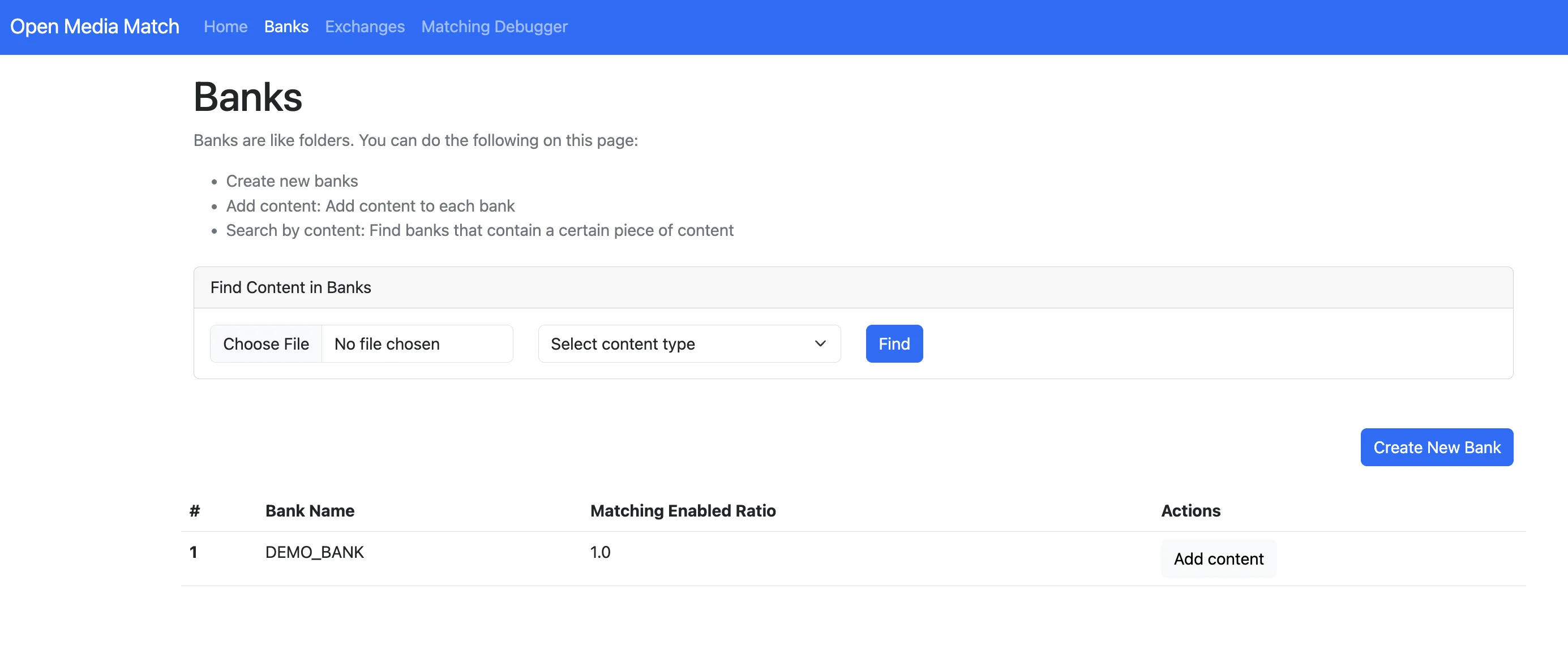
- See your content banks, e.g., the
SEED_BANK_0andSEED_BANK_1that are created using the demo buttons. - Each contains 5,000 sample hashes
- Try uploading images to test matching for content in hash banks
Creating a Demo Bank
Users can create a hash bank separate from external hash exchanges like the NCMEC hash list or GIFCT hash list. Simply click “Create New Bank” and manually upload a few files to test.
Once you add content, you can test by uploading either the same or different image in the “Find Content in Banks” section. If there is a match, the UI will show which hash bank the content was found in.
Adding Content to Banks
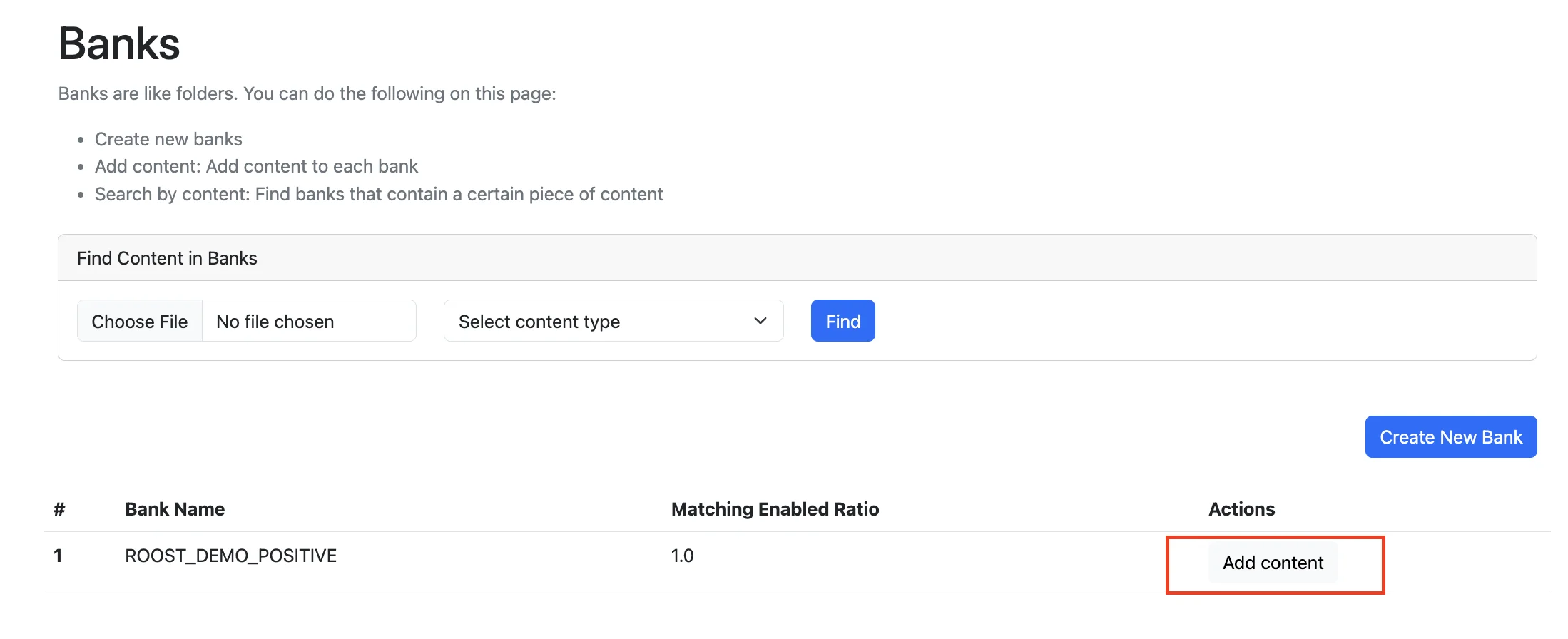
After clicking "Add Content": 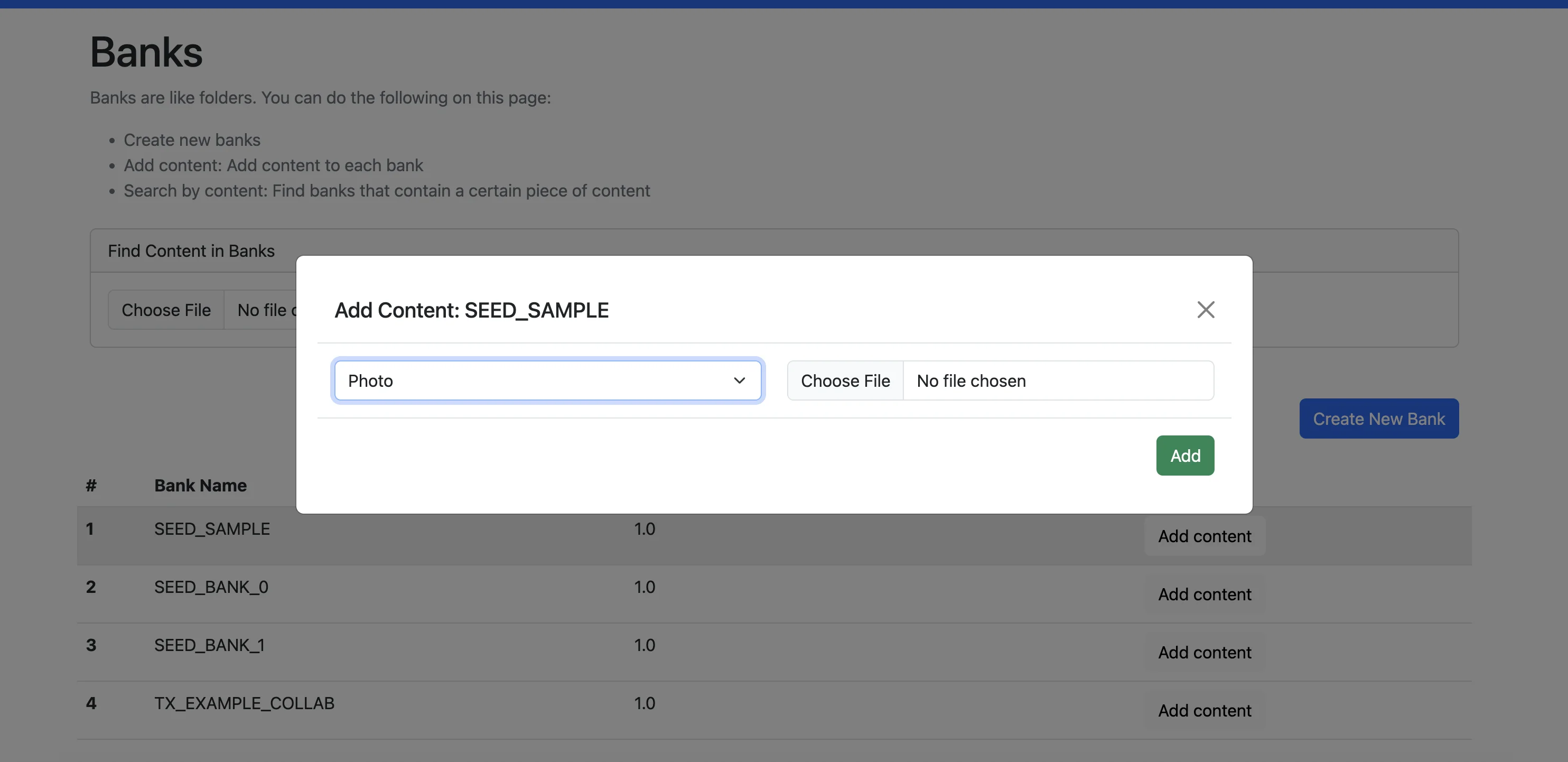
You can add new content to banks, which will then be returned by match queries from the UI.
Browsing Hash Banks
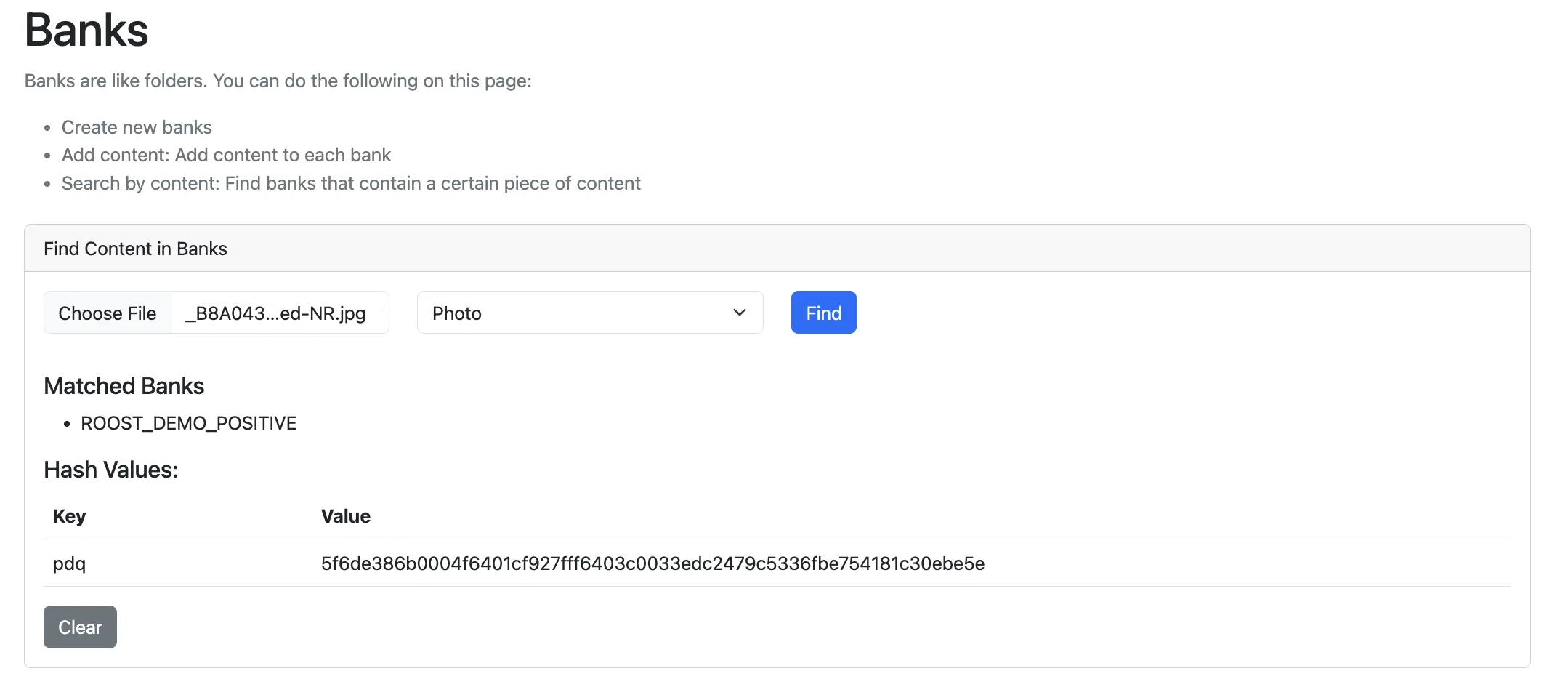
The web UI only allows searching for specific files within the hash banks. If users want to explore an overview or browse content in the hash banks, they have to query the database directly.
Database Table Stats (Quickest Overview)
Run this command to see high-level statistics:
flask --app OpenMediaMatch.app table_statsThis shows counts of banks, contents, signals, etc.
Direct Database Queries
You can also connect to PostgreSQL directly to browse the data:
# Connect to database
psql -h localhost -p 5432 -U media_match -d media_match
# Enter password: hunter2
# List all banks
SELECT * FROM bank;
# See all content in a specific bank
SELECT bc.id, bc.bank_id, b.name, cs.signal_type, cs.signal_val
FROM bank_content bc
JOIN bank b ON bc.bank_id = b.id
JOIN content_signal cs ON bc.id = cs.content_id
WHERE b.name = 'SEED_BANK_0';
# Count contents per bank
SELECT b.name, COUNT(bc.id) as content_count
FROM bank b
LEFT JOIN bank_content bc ON b.id = bc.bank_id
GROUP BY b.name;
REST API Endpoints
The API provides several endpoints to browse banks:
List all banks:
curl http://localhost:5000/c/banksGet specific bank info:
curl http://localhost:5000/c/bank/SEED_BANK_0Get specific content details:
curl http://localhost:5000/c/bank/SEED_BANK_0/content/1Exchanges (/ui/exchanges)
The Exchanges page lets users configure external hash exchanges that are API based. Some might requrie authentication and additional configuration. All exchanges support automatic periodic synchronization to keep the bank fresh; imported data goes into dedicated banks. Exchanges can be added to HMA by adding an extension
Default Hash Exchanges
NCMEC (National Center for Missing & Exploited Children)
- Child safety hash sharing program
- Automated hash synchronization
GIFCT (Global Internet Forum to Counter Terrorism)
- Terrorist content hash database
- Enterprise-level access required
- Real-time threat intelligence updates
Meta ThreatExchange
- Comprehensive threat intelligence platform
- API key authentication required
- Multi-signal type support
StopNCII
- Non-consensual intimate image hashes
- Privacy-focused hash sharing
- Victim-centered approach
Exchange Configuration
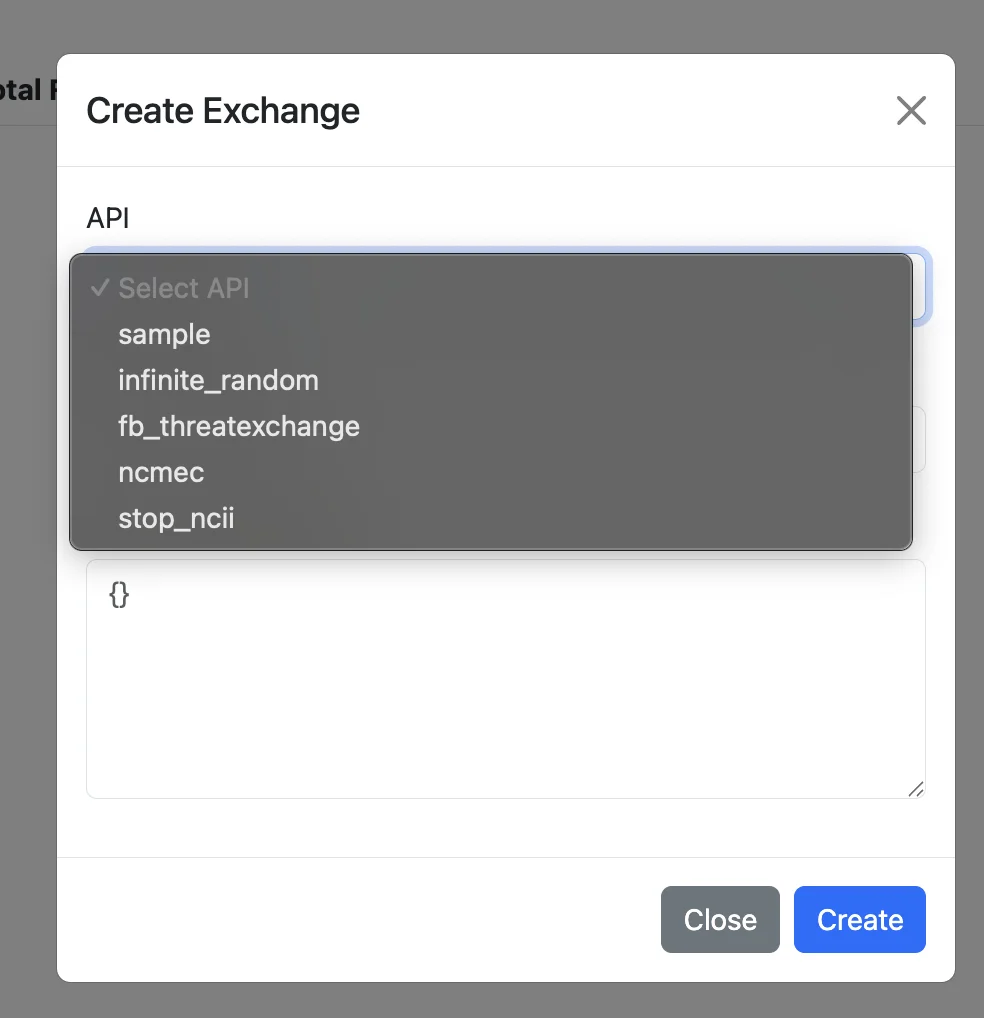
Several of the hash exchanges supported require credentials, provided in the form of a JSON blob. The JSON represents the CollabConfig for the exchange. The keys and data types must match the structure data. For example, here's the exchange config for NMCEC. Using it as an example, it has two fields:
- [Required] A field named environment which is a string enum for the API endpoint
- An optional field only_esp_ids, which accepts a container of ints. So one valid json blob would be
{ "environment": "https://hashsharing.ncmec.org/npo" }And one that filled out the optional field would be:
{ "environment": "https://hashsharing.ncmec.org/npo", "only_esp_ids": [1] }Users can use this configuration to:
- Configure authentication credentials (API keys, certificates)
- Select signal types to synchronize
- Set fetch frequency and retry policies
- Monitor connection health and data flow
- Monitor connection health and data flow
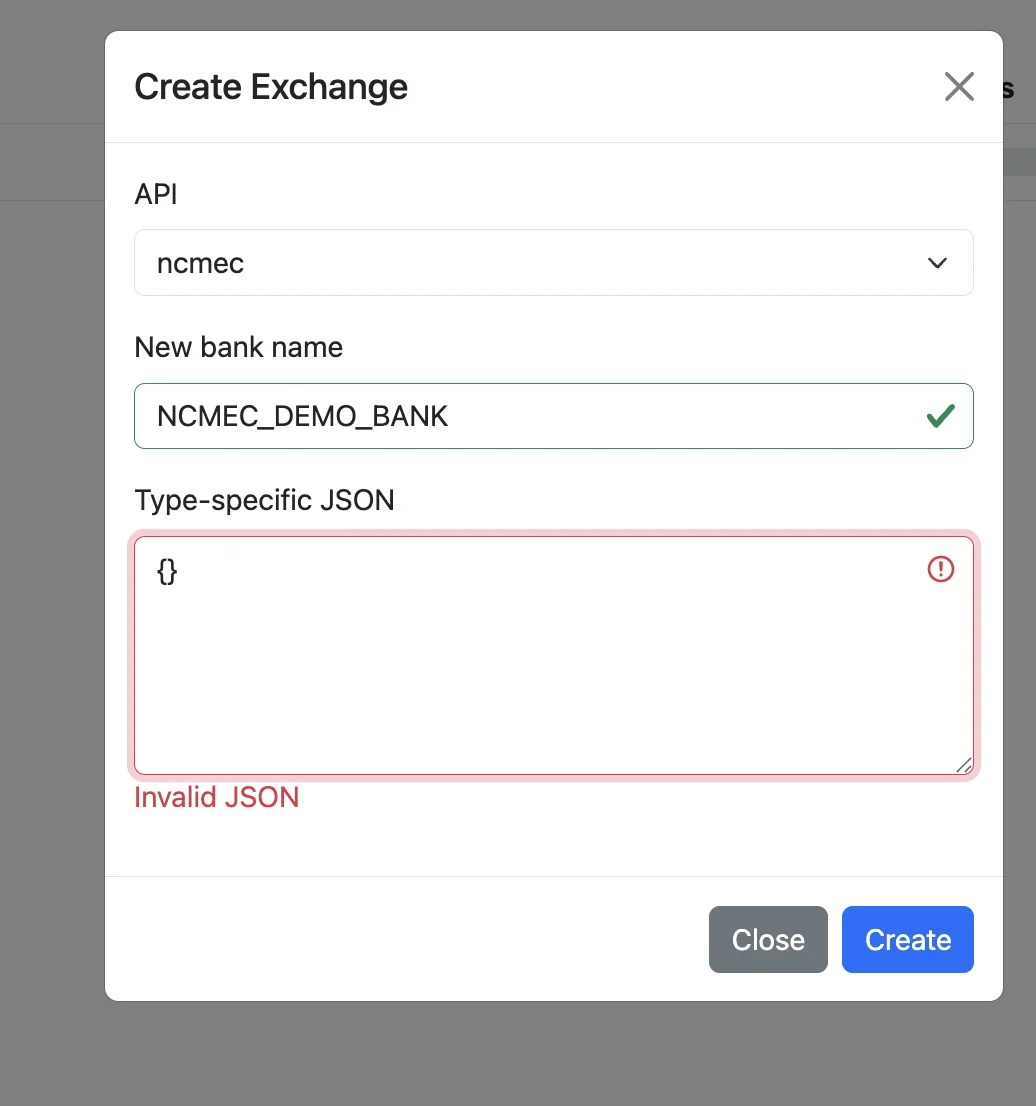
Right now, you'll need to know the exact form for the JSON, which can be challenging unless you've read the underlying code. python-threatexchange provides a CLI method that can help you create and view valid JSON, which can then be pasted into the tool tx collab config.
Match Debugging (/ui/match)
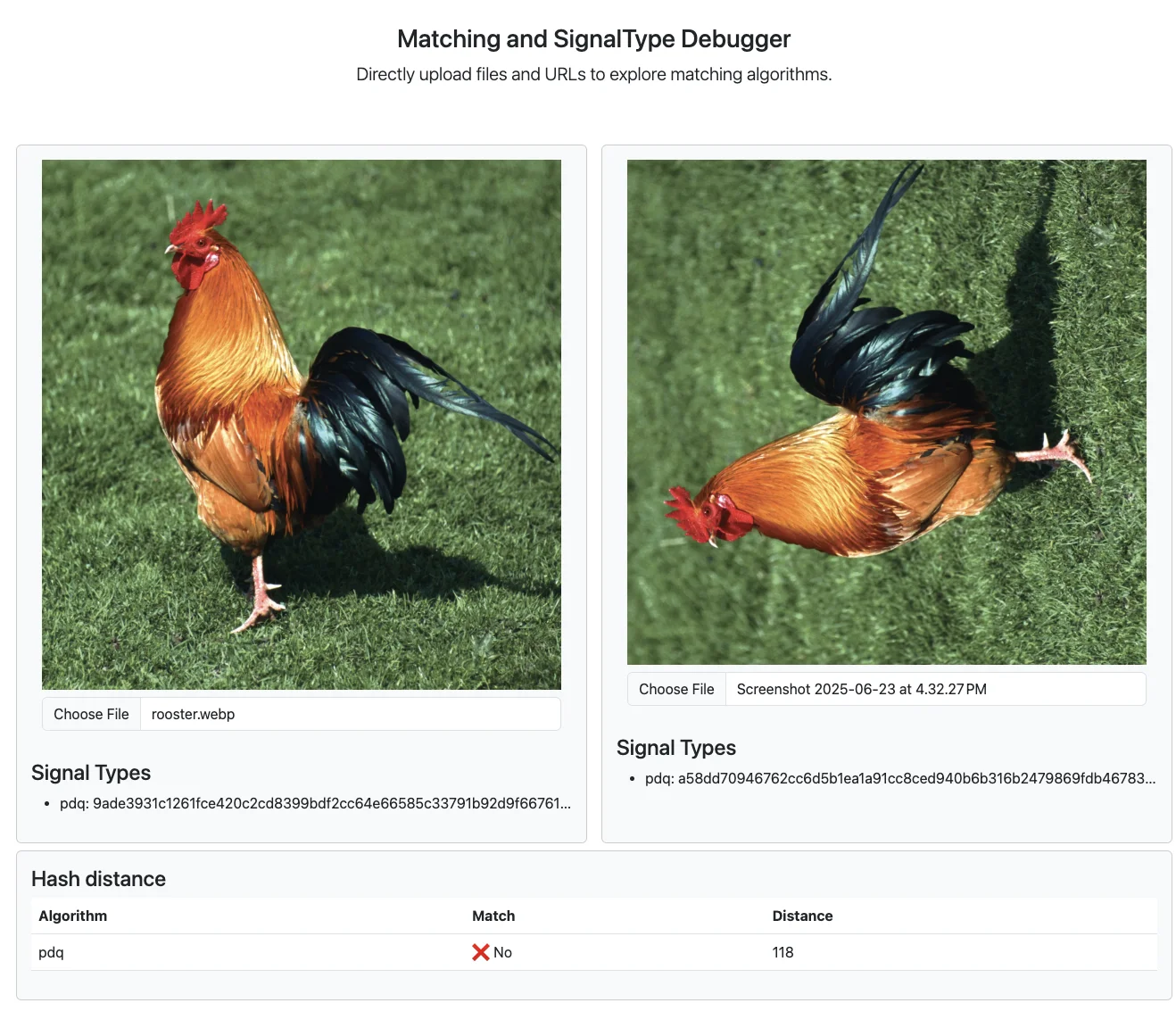
The Match Debugging page allows users to do a side-by-side comparison of two images to test different hashing algorithms and see how perceptual hashing works. As of June 2025, the demo only supports PDQ. This is helpful to tune matching thresholds and validate algorithms, which is essential for understanding false positive/negative rates.
If the images are a match, it will show a distance of 0, as follows: 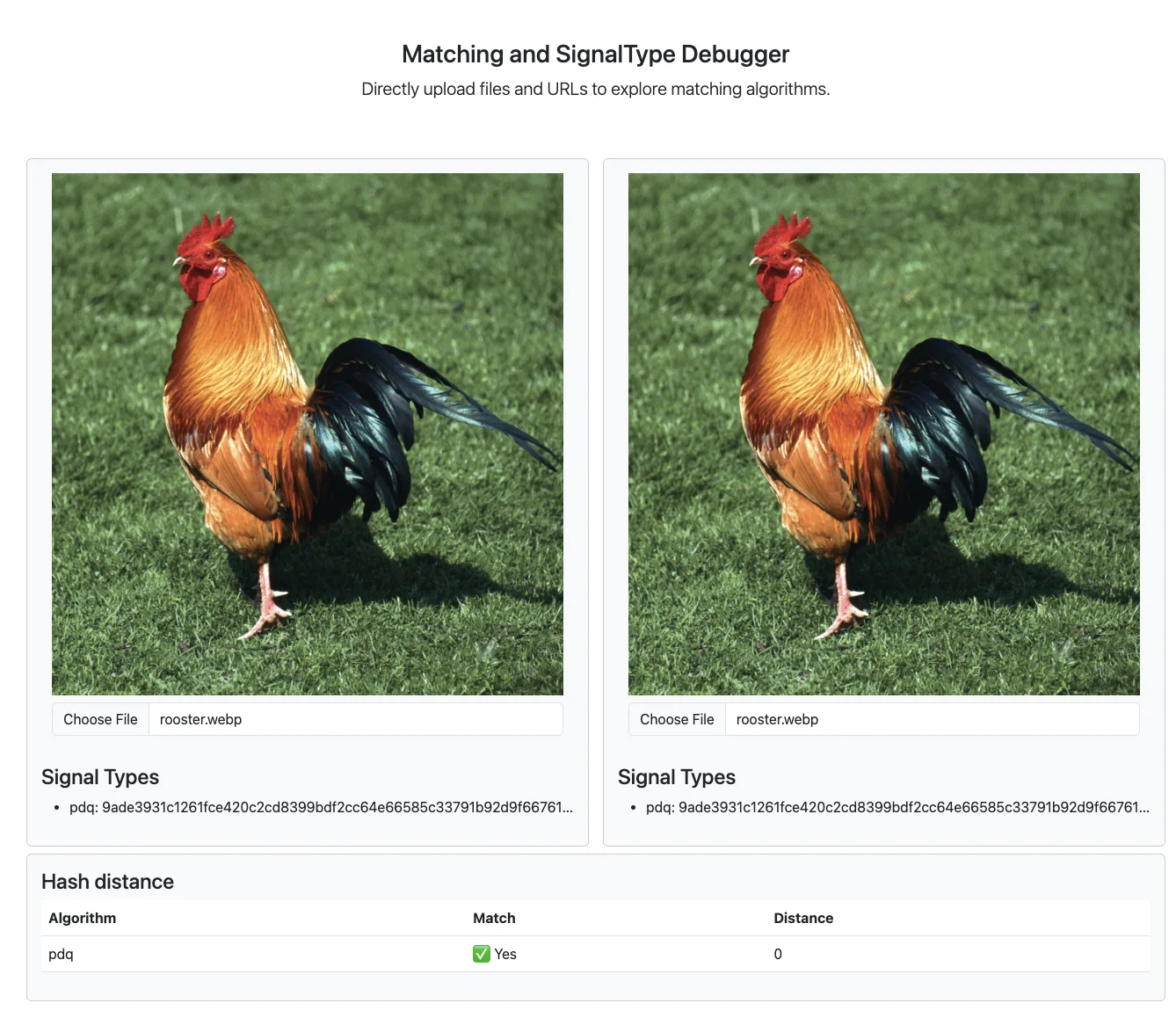
If the images are NOT a match, it will show whether it’s a match and the related distance between the two images: