Group Count
Type: Goal or Constraint
Limit how many objects of the same group land in the same scope item. For example, keep at most 3 tasks of any one job on the same host, so a single host failure takes down only part of each job.
Parameters
| Parameter | Type | Required | Default | Description |
|---|---|---|---|---|
name | string | Yes | - | Descriptive name for logging/debugging |
scope | string | Yes | - | Scope whose scope items are limited (e.g. "host", "rack") |
partitionName | string | Yes | - | Partition whose groups are counted (e.g. "job") |
dimension | string | No | object count | What to count per group in a scope item; defaults to the number of objects (use a dimension to limit a summed quantity instead) |
limit | Limit | No | ABSOLUTE, globalLimit 1 | The bound on each (group, scope item) pair (see Limit) |
bound | GroupCountSpecBound | No | MAX | Whether limit is an upper, lower, exact, or multiple bound (see Bound) |
limitRelativeTo | GroupCountSpecLimitRelativeTo | No | GROUP_SIZE | What a relative limit is a fraction of (see Limit) |
squares | bool | No | false | As a goal, square each excess before summing (see Squares) |
zeroAllowed | bool | No | false | With a MIN bound, lets a (group, scope item) pair be empty as an alternative to meeting the minimum |
definition | GroupCountSpecDefinition | No | AFTER | Which objects count toward a scope item (see Definition) |
filter | Filter | No | all scope items | Which scope items the spec applies to (see Filter) |
Example
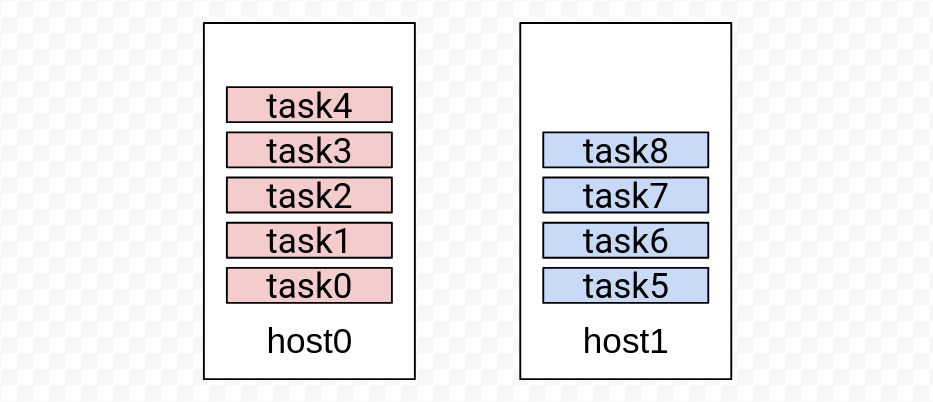
An example use: keep at most 3 tasks of the same job on the same host. There are 2
hosts and 9 tasks, partitioned into 2 jobs---task0-task4 are job0,
task5-task8 are job1. Initially all of job0 is on host0 (5 tasks) and
all of job1 is on host1 (4 tasks):
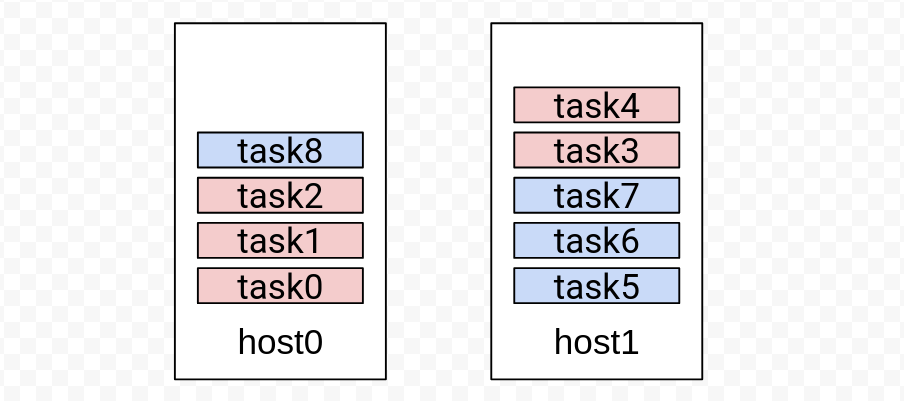
With a global limit of 3, Rebalancer moves 2 tasks of job0 from host0 to
host1, and 1 task of job1 from host1 to host0.
solver.setObjectName("task");
solver.setContainerName("host");

solver.setAssignment(std::map<std::string, std::vector<std::string>>{
    {"host0", {"task0", "task1", "task2", "task3", "task4"}},
    {"host1", {"task5", "task6", "task7", "task8"}},
});

// Let Rebalancer know which job each task belongs to.
solver.addPartition(
    "job",
    std::map<std::string, std::string>{
        {"task0", "job0"}, {"task1", "job0"}, {"task2", "job0"},
        {"task3", "job0"}, {"task4", "job0"}, {"task5", "job1"},
        {"task6", "job1"}, {"task7", "job1"}, {"task8", "job1"}});

// At most 3 tasks of the same job per host (counts objects by default).
GroupCountSpec groupCount;
groupCount.scope() = "host";
groupCount.partitionName() = "job";

Limit limit;
limit.type() = LimitType::ABSOLUTE;
limit.globalLimit() = 3;
groupCount.limit() = limit;

solver.addConstraint(groupCount);
The resulting assignment---each host now holds at most 3 tasks of any one job:
See more examples below for relative limits, per-scope-item and per-group limits, minimum bounds, and the squares objective.
Goal vs. constraint
As a constraint, the limit is enforced. If the initial assignment already satisfies it for a (group, scope item) pair, the final assignment is guaranteed to satisfy it too. If the initial assignment breaks it, the general constraint policy applies: under the default policy an initially-broken pair becomes a high-priority goal to fix, while "do not make it worse" stays a hard constraint.
As a goal, the spec's value is proportional to the total count exceeded beyond the limit, summed over every (group, scope item) pair.
Bound
The bound selects how the limit is interpreted:
| Bound | Meaning |
|---|---|
MAX (default) | At most limit objects of a group per scope item |
MIN | At least limit objects of a group per scope item |
EXACT | Exactly limit objects of a group per scope item |
MULTIPLE | The count must be an integer multiple of limit |
A MIN bound forbids a (group, scope item) pair from being empty. When the
desired behavior is "either empty, or at least the limit", set zeroAllowed to
true. See Example 9 below.
EXACT and MULTIPLE need the optimal solverEXACT (and MULTIPLE) work poorly with the local-search solver: it improves the
assignment through small incremental moves, but satisfying an exact/multiple bound
usually requires a coordinated set of moves at once, so most single moves fail and
the search stalls. Use the optimal (MIP) solver for these
bounds.
Limit
The limit is a Limit. A limit applies to each (group,
scope item) pair, and there are several ways to specify it; pairs not covered fall
back to globalLimit:
| Field | Effect |
|---|---|
globalLimit | One limit for all pairs (and the fallback for the maps below) |
scopeItemLimits | A limit per scope item, shared by all groups there (Example 3) |
groupLimits | A limit per group, shared across all scope items (Example 5) |
scopeItemToGroupLimits | A limit per (scope item, group) combination (Example 7) |
The type field chooses how each number is read:
ABSOLUTE--- a raw count (or, with adimension, a raw summed quantity). A global limit of 3 means at most 3 objects of a group per scope item (the example above).RELATIVE--- a proportion. A limit of0.7means at most 70% of a group may land on one scope item (Example 2).
By default a relative limit is measured against the group's size
(limitRelativeTo = GROUP_SIZE). Set limitRelativeTo = SCOPE_ITEM_UTIL to make
it a proportion of the scope item's own utilization instead---e.g. "no group may
account for more than 50% of a host's utilization" (Example 11).
Squares
Only relevant when used as a goal. With squares = true, each pair's excess above
the limit is squared before summing, so larger overflows are penalized
disproportionately---use it to even out the excess across pairs. For two solutions
where pair A exceeds by 10 and B by 0, versus A by 5 and B by 5, the plain goal
scores both 10, but with squares the second (5² + 5² = 50) beats the first
(10² = 100).
A common idiom is a "balance" objective: set the limit to 0 with squares
enabled to minimize the sum of squared per-(group, scope item) counts, spreading
each group as evenly as possible (Example 10).
squares is not supported by the optimal (MIP) solver. If you need it there, model
each group with a separate dimension and a Balance goal.
Definition
The definition controls which objects are counted toward a scope item. The
default, AFTER, counts an object in its destination scope item in the final
assignment---the natural choice. The others additionally count objects in flight,
which helps when moves are not instantaneous in the system being modeled.
| Definition | Counts |
|---|---|
AFTER (default) | An object only in its destination scope item |
DURING | An object in both its source and destination (double-counted while moving) |
DURING_AND_AFTER | The sum of DURING and AFTER |
STAYED | Only objects that did not move |
See Utilization definitions for a detailed
explanation with diagrams (GroupCount shares the core AFTER/DURING/
DURING_AND_AFTER notions).
Filter
The filter (Filter) selects which scope items the spec
applies to: set itemsWhitelist (consider only these) or itemsBlacklist
(consider all but these). For example, to apply the limit to host0 only:
GroupCountSpec groupCount;
groupCount.scope() = "host";
groupCount.partitionName() = "job";

Limit limit;
limit.type() = LimitType::ABSOLUTE;
limit.globalLimit() = 3;
groupCount.limit() = limit;

// Apply the limit to host0 only (use itemsBlacklist to exclude instead).
groupCount.filter()->itemsWhitelist() = {"host0"};

solver.addConstraint(groupCount);
More Examples
All examples below start from the same setup as the example above: 2
hosts and 9 tasks, with job0 (5 tasks) on host0 and job1 (4 tasks) on
host1. Each links to its runnable unit test.
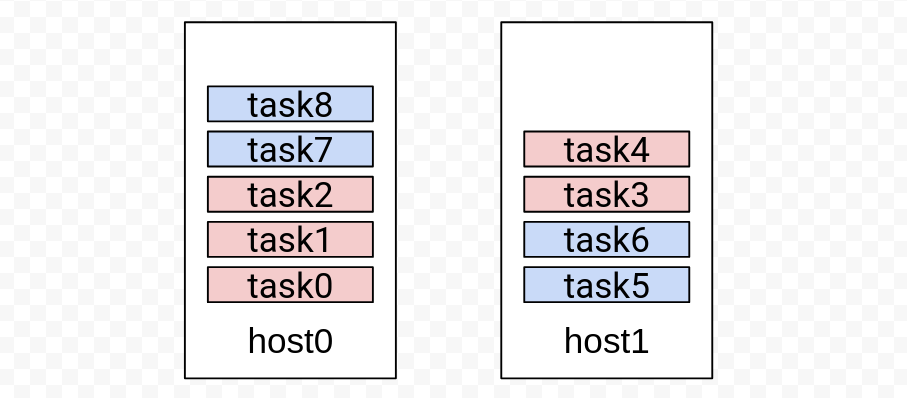
Example 2: global relative limit
At most 70% of a job's tasks on one host. Rebalancer moves 2 tasks of job0 from
host0 to host1, and 2 tasks of job1 from host1 to host0.
(source)
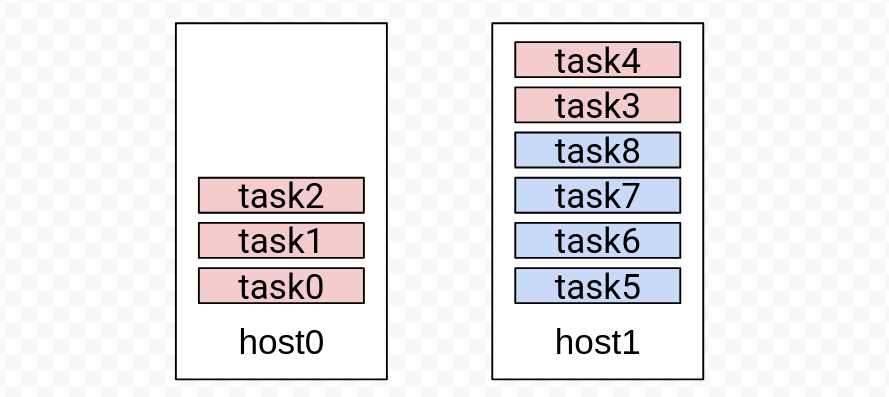
Example 3: per-scope-item absolute limit
host0 accepts up to 3 tasks of the same job; any other host up to 5 (the global
limit). Rebalancer moves 2 tasks of job0 off host0; job1 is left untouched.
(source)
Example 4: per-scope-item relative limit
host1 accepts at most 50% of a job's tasks; any other host up to 100%.
Rebalancer moves half of job1's tasks from host1 to host0.
(source)
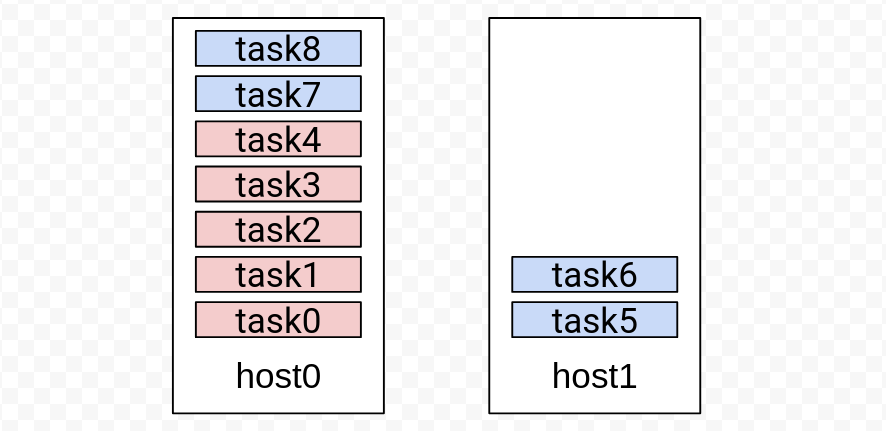
Example 5: per-group absolute limit
job1 may place at most 3 of its tasks on the same host; any other job up to 4.
Rebalancer moves 1 task of job0 and 1 task of job1.
(source)
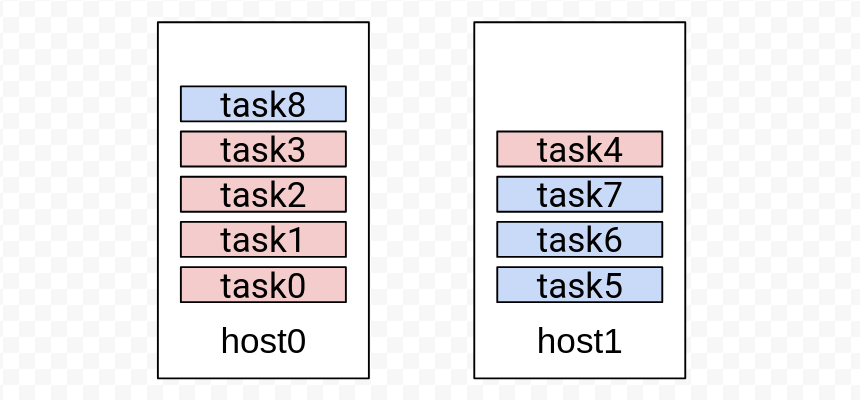
Example 6: per-group relative limit
job0 may place up to 60% of its tasks on one host, job1 up to 50%. Rebalancer
moves 2 tasks of job0 and 2 tasks of job1.
(source)
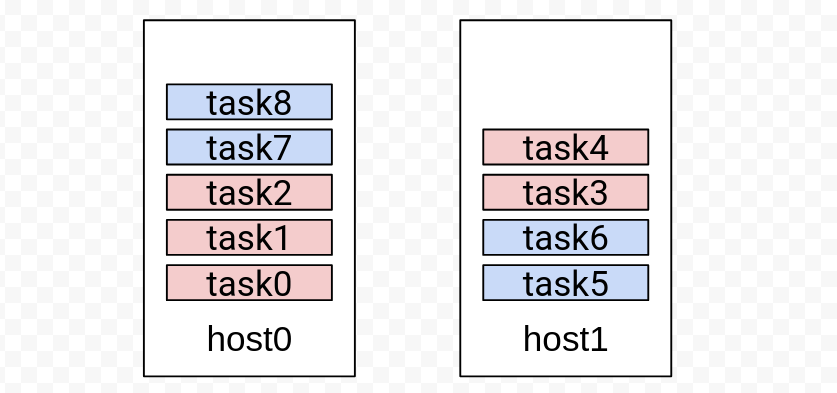
Example 7: per-(scope-item, group) absolute limit
job0 may place up to 2 tasks on host0 and up to 4 on host1; job1 up to 1
on host0; any other combination up to 5. Rebalancer moves 3 tasks of job0
from host0 to host1; job1 has no incentive to move.
(source)
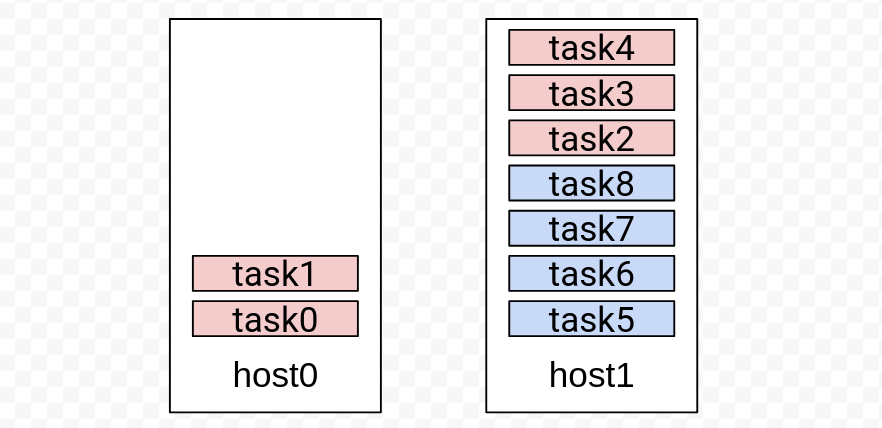
Example 8: per-(scope-item, group) relative limit
job0 may place up to 50% of its tasks on host0; any other job up to 80% on any
host. Rebalancer moves 3 tasks of job0 off host0 and 1 task of job1 off
host1.
(source)
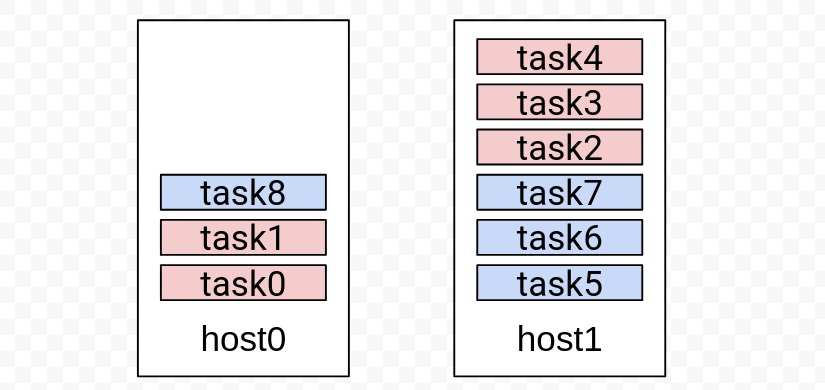
Example 9: min bound
A MIN bound with a limit of 1: each job must place at least 1 task on every host.
Rebalancer moves 1 task of job0 to host1 and 1 task of job1 to host0.
(source)
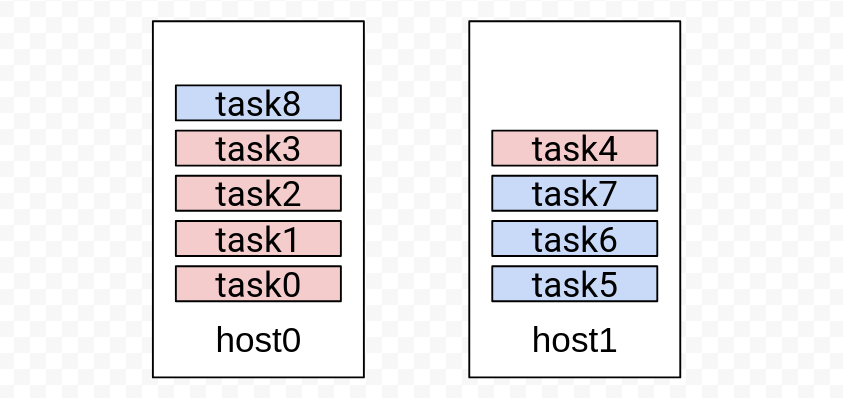
Example 10: squares objective
Used as a goal with limit 0 and squares enabled---a balance objective that
spreads each job evenly. Rebalancer moves 2 tasks of job0 and 2 tasks of job1.
(source)
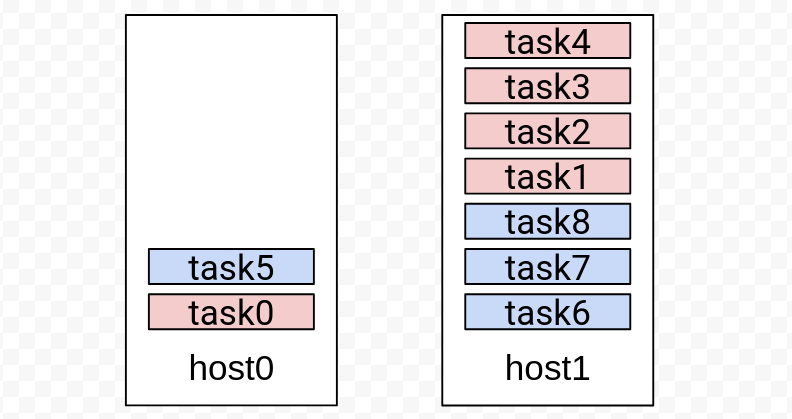
Example 11: limit relative to scope-item utilization
With limitRelativeTo = SCOPE_ITEM_UTIL, job0 may not account for more than 50%
of host0's utilization (plus a MIN capacity constraint so host0 is not simply
emptied). The result leaves host0 with 2 tasks, one from each job.
(source)
Source
- Thrift definition:
interface/thrift/ProblemSpecs.thrift(GroupCountSpec) - SpecBuilder:
materializer/spec_builder/GroupCountSpecBuilder.cpp---the code that defines this spec's behavior - Tests and runnable examples:
interface/tests/GroupCountTest.cpp(C++) andinterface/py_client/tests/group_count_test.py(Python)---the unit tests the snippets on this page are drawn from